Mascure: Streamline Your Next Big Presentation with This Google Slides Toolkit
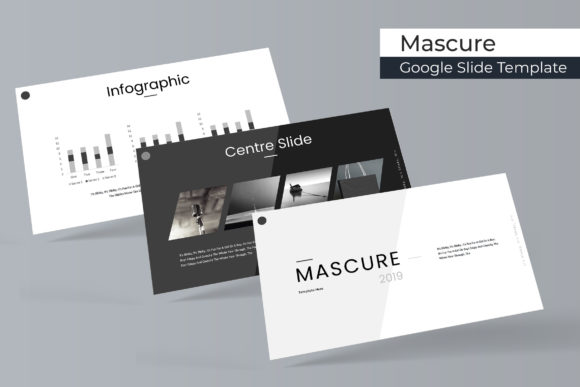
Every entrepreneur, marketer, or designer eventually hits that wall where creating a presentation from scratch feels like reinventing the wheel. You open a blank canvas in Google Slides, stare at the blinking cursor, and wonder how to make your data look professional without spending hours aligning boxes. This is where having a robust design asset toolkit changes the game. The Mascure Google Slide Template is designed specifically to bridge the gap between a blank slate and a polished, client-ready pitch deck. It isn't just about having slides; it’s about having a structured visual language that communicates authority and clarity instantly. With over 150 total slides and five premade color variations, this resource allows you to stop worrying about layout and start focusing entirely on your narrative.
A Deep Dive into Visual Consistency and Color Theory
One of the most challenging aspects of modern presentation design is maintaining visual consistency. You want your brand colors to pop, your fonts to be legible, and your graphics to align perfectly. The Mascure template addresses this by offering 30 unique slides for each of the 5 premade color templates. This variety is crucial because it prevents your presentation from looking repetitive while maintaining a cohesive brand identity. Whether you are pitching to investors, conducting a workshop, or creating a marketing report, the color palette options ensure that your slides match your specific brand identity without requiring manual color grading on every single object.
Furthermore, the template includes Section Break Slides. This might seem like a minor detail, but in practice, it is a powerful tool for audience engagement. A dedicated section break allows your audience to mentally reset and prepare for the next topic. It acts as a visual pause button, making your information digestible. When you combine this with pixel-perfect illustrations, the result is a presentation that feels curated rather than thrown together. These aren't just generic shapes; they are handcrafted infographics designed to make complex data easy to understand, enhancing the professional presentation of your business or project.
Practical Applications: Beyond the Boardroom
While the primary function of this asset is for Google Slides and PowerPoint, the utility of such a high-quality template extends far beyond standard business meetings. Consider the needs of a content creator or a small business owner managing their own marketing. You can adapt the Gallery and Portfolio slides to showcase your work visually. For instance, a photographer or graphic designer can use the picture placeholder feature to drag and drop high-resolution images directly into the frames. This creates a digital lookbook that can be shared as a PDF or presented live to clients.
For those involved in social media graphics and digital products, the Mascure template serves as a fantastic starting point for editorial layouts. You can screenshot individual slides to create Instagram carousels or Pinterest graphics that maintain a consistent aesthetic. Because the graphics are resizable and editable, you can tweak the illustrations to fit different aspect ratios without losing quality. This versatility makes it a valuable component of your broader design assets library. It’s not just a presentation tool; it’s a visual communication system that can be repurposed for packaging design mood boards, web design mockups, or even print materials like brochures and invitations.
Efficiency in Workflow: Master Slides and Drag-and-Drop
Time is a non-renewable resource, especially for freelancers and agency owners. The technical build of the Mascure template is optimized for speed. Built upon Master Slides, the template ensures that global changes—like updating a footer or changing a font style—can be done in seconds across all 150+ slides. This structural integrity is what separates a premium template from a free, amateur download.
The drag & drop functionality is another feature that streamlines the creative process. You don't need to be a technical wizard to make the slides look custom. The picture placeholders allow you to insert your own photography or stock images with a single click. This is particularly useful for logo design presentations or packaging proposals where the client needs to see their actual product integrated into the mockup. By removing the technical friction of layout adjustments, you free up mental energy to focus on the story you are telling, whether that story is a brand identity guide or a quarterly financial review.
Typography and Readability: The Foundation of Engagement
Visuals grab attention, but typography holds it. A common pitfall in presentation design is choosing fonts that look stylish but fail in terms of readability, especially when projected on a screen. The creators of the Mascure template understand this, which is why they provide a Readme First guide and links to the free font downloads used in the design. This attention to detail ensures that when you open the file, you aren't greeted with missing font warnings or broken layouts.
Using the recommended fonts ensures that your modern typography choices align with the template’s geometry. However, the design is also flexible enough to accommodate your own brand fonts. If you are a brand strategist or marketing professional, you can easily swap the default typeface for your corporate serif or sans serif font. The key is to ensure that your text hierarchy remains clear. Headlines should command attention, while body text should be effortless to read. The layout of the Mascure slides supports this hierarchy, providing ample white space that prevents cognitive overload for your audience.
What’s Included and How to Maximize Your Investment
When you invest in a design tool, understanding exactly what you are getting is vital to avoid workflow disruptions. The Mascure package is comprehensive, ensuring you have everything you need to start immediately. Here is a breakdown of the deliverables:
- 5 PPTX Files & 5 PPTX Widescreen Files: This dual-format approach ensures compatibility whether you are presenting on a standard monitor or a modern widescreen projector.
- 5 Premade Colors: Pre-selected color palettes that are balanced and professional, saving you the guesswork of color matching.
- Readme First & Font Links: Essential documentation to ensure your typography renders correctly from the start.
It is important to note that photographs or pictures used in the preview are not included. This is standard practice for premium font and template marketplaces to keep costs down and licensing simple. You will need to supply your own high-quality imagery. This is actually an advantage, as it forces you to use authentic photos of your own products, team, or services, which significantly boosts audience engagement compared to generic stock photography.
Final Thoughts on Creative Flexibility
Whether you are a hobbyist creating a presentation for a community group or a creative entrepreneur pitching a six-figure contract, the Mascure Google Slide Template provides the scaffolding for success. It combines the aesthetic appeal of handcrafted infographics with the utility of editable graphics. By leveraging this tool, you ensure that your visual communication is polished, professional, and persuasive, allowing your ideas to take center stage without the distraction of poor design.