Streamline Your Presentations with the Booklet Keynote Template
Imagine this: you have a major pitch in two days, a client who needs to see a polished brand strategy, and a slide deck that currently looks like a chaotic mess of text boxes and mismatched fonts. We’ve all been there. Creating a visually cohesive and professional presentation from scratch is a time-consuming task that often pulls you away from the actual strategy work. That’s where having a robust, versatile toolkit changes the game. The Booklet Keynote Template is designed to be that silent partner for designers, entrepreneurs, and marketers who need to communicate complex ideas with clarity and style, without starting from zero every single time.
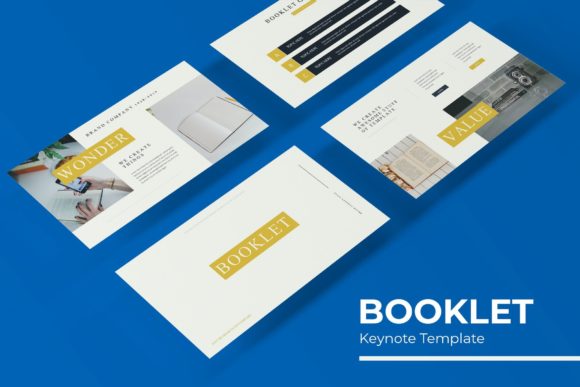
At its core, this template is a comprehensive presentation system built for Keynote. It’s not just a collection of random slides; it’s a structured framework that includes over 150 total slides, meticulously organized into five premade color themes. Each color variation offers 30 unique slides, giving you a consistent visual language right out of the box. The design philosophy here is one of professional minimalism and clarity, focusing on content-first layouts that let your message shine. The pixel-perfect illustrations and handcrafted infographics are particularly noteworthy—they’re clean, modern, and avoid the overly generic look of many stock templates, making them suitable for everything from a corporate report to a creative portfolio.
More Than a Slide Deck: A Multifaceted Design Asset
Think of the Booklet Keynote Template as a Swiss Army knife for your visual communication needs. Its true value lies in its adaptability across a wide range of projects, acting as a foundation for consistent brand storytelling. For a small business owner developing a brand identity, the color schemes and master slides provide an immediate starting point for establishing a visual tone. The layout options are ideal for structuring a brand guidelines booklet directly within Keynote, ensuring that your typography, color palette, and imagery rules are presented professionally to stakeholders or new team members.
Content creators and marketers will find the structured slides invaluable for crafting social media strategy decks, content calendars, or influencer partnership proposals. The gallery and portfolio slides are perfect for showcasing past work, case studies, or product features in a visually engaging way that holds an audience's attention. Furthermore, the template’s design is inherently scalable. The resizable and editable graphics, combined with the drag-and-drop picture placeholders based on master slides, mean you can adapt a single presentation into multiple assets. Export a slide as a high-resolution image for a blog header, repurpose an infographic for a PDF lead magnet, or use a section break slide as the basis for a stunning poster or invitation design.
Practical Features That Save Time and Enhance Quality
What makes this template particularly practical for day-to-day use are the thoughtful, built-in features that streamline the creation process. The pixel-perfect illustrations and handcrafted infographics aren’t just decorative; they are functional tools for explaining data, processes, and concepts. Instead of searching for and trying to style a generic chart, you can simply input your data into a pre-designed, visually coherent infographic that aligns with the overall presentation aesthetic. This drastically improves visual consistency, which is a cornerstone of professional presentation design and brand recognition.
The technical setup is equally user-friendly. Being based on master slides means that global changes—like updating a logo, adjusting a font, or tweaking a color accent—can be done once and will automatically update across all relevant slides. This is a massive time-saver and a safeguard against inconsistent formatting. The drag-and-drop picture placeholder feature is another efficiency booster, allowing you to swap images seamlessly without worrying about resizing or repositioning elements. For anyone who has wrestled with aligning images in Keynote, this alone is a significant quality-of-life improvement.
Tailoring the Template to Your Project’s Goals
Choosing the right presentation template is similar to choosing a premium font for a project; it needs to match the personality and objective of your content. The Booklet Keynote Template’s strength is its balanced, modern typography and clean layouts, which lend themselves well to a variety of tones—from professional and authoritative to creative and approachable. When you open the files, you’ll notice the included font is a clean, highly readable sans-serif, which is a smart choice for ensuring legibility across different screen sizes and in printed handouts. The template package includes a “Readme First” file and a link to download the free font used, so you can maintain exact consistency.
A practical piece of advice: before diving in, take a moment to review all five color variations and the full slide library. Map out your presentation’s narrative flow first, then select the color theme that best aligns with your brand or the project’s mood. Don’t feel constrained to use every slide; the variety is there to offer options. Mix and match slides from the 30 per color set to build your unique story. Consider the included section break slides as intentional pause points in your narrative—they help segment information and give your audience a visual breather, which improves overall comprehension and engagement.
Ultimately, the goal of any design asset is to make you look good while making your job easier. This template does both. It provides a professional, polished foundation that elevates the perceived quality of your work, which is crucial for building trust with clients, investors, or an audience. By handling the heavy lifting of layout and design, it frees up your mental energy to focus on what truly matters: your message, your strategy, and your creative ideas. Whether you’re building a brand from the ground up, pitching a new marketing campaign, or compiling a visual portfolio, having a versatile and well-constructed template like this in your toolkit is a practical investment in your productivity and your professional image.