Mastering Your Pitch: The 1945 Google Slide Template
We have all been there—staring at a blank slide deck at 11 PM, desperately trying to align text boxes and match color hex codes while the deadline looms. Whether you are a marketing professional pitching a new client, a small business owner presenting quarterly results, or an educator crafting a curriculum, the presentation is often the front door to your ideas. But creating a presentation that looks polished, professional, and visually distinct usually requires either advanced design skills or a massive budget. This is where the utility of high-quality design assets comes into play. If you are looking to bridge the gap between a standard pitch and a visually stunning narrative, having a robust template library is not just a convenience; it is a strategic necessity.
Beyond the Blank Canvas: Why Structure Matters
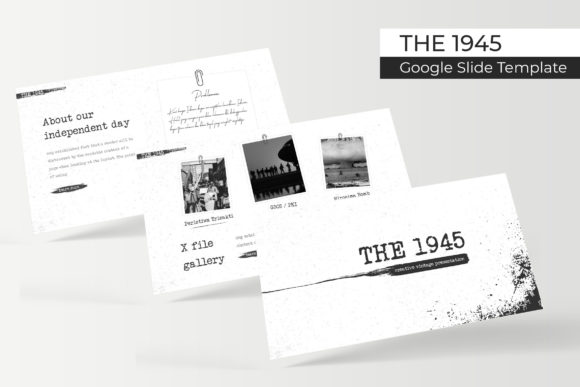
The 1945 Google Slide Template is not just a collection of empty slides; it is a comprehensive presentation ecosystem designed to handle complex storytelling. When we talk about design assets that actually save time, we are looking for tools that solve problems before they arise. This particular template package addresses the common pain point of variety and consistency. With over 150 total slides included, you are not just getting a single linear path for your story. You are getting the flexibility to adapt to different data types and narrative flows without having to build graphics from scratch.
The inclusion of handcrafted infographics is perhaps the most valuable aspect of this package for anyone in a professional setting. Data visualization is notoriously difficult to do well. A standard bar graph in PowerPoint or Google Slides often looks dated or cluttered. By utilizing pixel-perfect illustrations and pre-designed infographics, you can present complex data sets—like market growth, workflow processes, or demographic breakdowns—in a way that is intuitive and aesthetically pleasing. This elevates the perceived value of the data itself. When your visuals look premium, your audience subconsciously attributes that quality to the information you are presenting.
The Power of Color Psychology and Variety
One of the standout features of The 1945 Google Slide Template is the strategic use of color. We often underestimate how color palettes affect the mood of a room (or a Zoom call). The package includes five premade color variations, with 30 slides dedicated to each specific palette. This is crucial for branding consistency. If you are a startup founder, you likely have specific brand guidelines that dictate your primary and secondary colors. Having multiple color options allows you to select the variation that aligns closest to your existing brand identity, or even use different palettes for different departments—for example, a cool blue for finance presentations and a vibrant red for sales decks.
This approach moves your presentation from looking like a generic corporate template to a bespoke design asset. It demonstrates an understanding of visual communication that goes beyond simply placing text on a slide. The "Handcrafted Infographic" element ensures that these colors are applied in a way that maintains readability and visual hierarchy, preventing the "rainbow effect" that makes amateur presentations look chaotic.
Practicality Meets Design: The Drag-and-Drop Workflow
For the busy entrepreneur or the content creator managing multiple channels, time is the most expensive currency. The technical architecture of this template is built around efficiency. Being "Based on Master Slides" means that the design is structurally sound. You can make global changes to fonts or layouts without breaking the individual slide designs. This is a lifesaver when a client suddenly changes their logo halfway through a project.
Furthermore, the "Resizable and Editable Graphic Picture Placeholder" feature is a game-changer for visual storytelling. We have all struggled with cropping images to fit awkwardly shaped boxes. With a drag-and-drop interface, inserting high-quality photography becomes seamless. This is particularly useful for portfolio presentations or case studies where you need to showcase visual work. Instead of wrestling with aspect ratios, you simply drag your image into the placeholder, and the template handles the cropping and framing automatically. This allows you to focus on the content—the narrative of your pitch—rather than the technical mechanics of the software.
Strategic Applications for Brand Identity
While this is technically a slide template, its utility extends far into general branding and marketing assets. Think of the "Section Break Slides" and "Gallery and Portfolio slides" as modular components for your visual identity.
- Pitch Decks & Investor Relations: Use the clean layouts to convey professionalism and stability. The structured grids help build trust with investors who want to see organized data.
- Social Media Content: You don't have to use these solely for live presentations. By exporting individual slides as high-resolution images (JPG or PNG), you can create a cohesive set of Instagram carousels, Facebook posts, or Pinterest graphics that match your presentation perfectly. This creates a unified cross-channel experience for your audience.
- Digital Products & Lead Magnets: If you are a course creator or blogger, you can repurpose the slides into a downloadable PDF workbook or an eBook. The 16:9 widescreen format works beautifully on tablets and laptops, providing a high-end feel to your digital products.
- Internal Training & Onboarding: For HR departments or team leaders, having a consistent template for training materials ensures that company culture and values are communicated visually, reinforcing brand identity even in internal documents.
Typography and Readability Considerations
A presentation is only as good as its readability. The 1945 Google Slide Template includes a "Readme First" file and links to the specific fonts used, which is a detail that separates amateur designers from professionals. Typography is the voice of your design. If you mix too many fonts or use styles that clash, the message gets muddied.
This template likely pairs specific serif or sans-serif fonts to create a hierarchy between headers and body text. When using this template, pay close attention to the font pairings provided. If you decide to customize the fonts to match your brand, stick to the rule of two: one font for headings and one for body text. This maintains the "Pixel-perfect" aesthetic the template promises. Avoid the urge to add a third "fun" font for quotes or callouts, as this often disrupts the visual flow established by the master slides.
Final Thoughts on Maximizing Your Asset
Investing in a premium template like The 1945 is about buying back your time and upgrading your visual credibility. It eliminates the "design paralysis" that stops many great ideas from being presented effectively. By leveraging the 150+ slides and the five color variations, you have a toolkit that can adapt to almost any professional scenario—from a somber financial report to a vibrant product launch.
Remember that the template is the vehicle, but your content is the driver. Use the gallery slides to let your work breathe, use the infographics to clarify your points, and use the master slides to ensure that every single page looks like it belongs to the same family. Whether you are building a brand from the ground up or refreshing an existing corporate identity, having a versatile, well-structured, and visually articulate presentation template is one of the smartest moves you can make for your business communication.