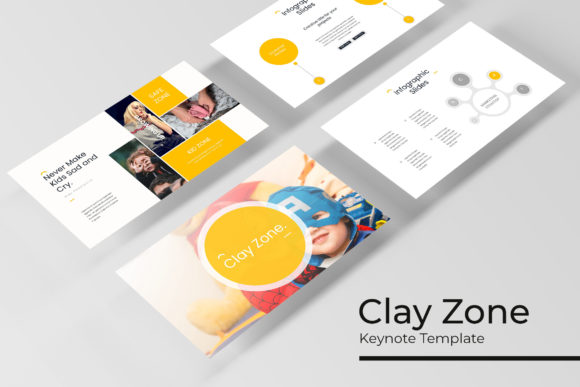
Mastering Presentations with the Clayzone Keynote Template
Creating a presentation that holds attention from the first slide to the last is a common challenge. It requires a blend of clear information, strong visual design, and a cohesive narrative. Many professionals find themselves spending more time wrestling with slide layouts than refining their message. The Clayzone Keynote Template is designed to address this exact problem, offering a comprehensive toolkit for anyone who needs to communicate ideas effectively and beautifully. It’s more than just a set of slides; it’s a system for building professional presentations that look polished and intentional.
A Visual System Built for Impact
What immediately sets this template apart is its structured approach to design. With over 150 total slides, the volume alone is impressive, but the real value lies in its organization. The template is built on five premade color themes, each containing 30 meticulously crafted slides. This means you’re not starting from a blank canvas or a single, inflexible design. Instead, you choose a color palette that aligns with your brand or topic—perhaps a muted, professional tone for a corporate report or a vibrant, energetic scheme for a product launch—and you instantly have a full deck of slides designed to work together harmoniously.
The design philosophy here is one of handcrafted quality. The infographics are not generic, auto-generated charts; they are pixel-perfect illustrations designed to make data understandable and engaging. Section break slides provide a visual pause, helping to structure your talk and guide your audience through different chapters of your story. The inclusion of gallery and portfolio slides is a particularly smart feature for creative professionals, designers, photographers, or agencies who need to showcase work in a clean, compelling format without building layouts from scratch.
Practical Applications Beyond the Boardroom
While the immediate use case is business presentations, the versatility of a template like this extends into numerous creative and commercial projects. Consider the needs of a small business owner or a content creator. The same principles of clear communication and strong visual hierarchy apply to:
- Brand Pitches and Proposals: Use the template to present a new brand identity, showcasing logos, color palettes, and mockups on dedicated slides.
- Marketing and Sales Decks: Structure a campaign overview, customer journey maps, or sales figures in a way that tells a persuasive story.
- Educational Workshops and Tutorials: Break down complex information into digestible slides with the help of diagrams and step-by-step infographics.
- Portfolio Presentations: For freelancers in web design, illustration, or packaging design, the gallery slides offer a professional way to display past work to potential clients.
- Internal Communications: Even internal project updates, team training, or quarterly reviews benefit from a consistent, professional template that boosts readability and engagement.
The key is that the template handles the heavy lifting of design consistency. This frees you up to focus on the content itself—whether that's the wording of your key message, the selection of the perfect case study, or the data that supports your argument.
Designed for Real-World Efficiency
A beautiful template is only useful if it’s practical. The Clayzone Keynote Template is built on master slides, which is the cornerstone of its user-friendliness. This means you can make a change to the master layout—like adjusting the position of a title placeholder—and that change will automatically apply to every slide using that master. It ensures absolute visual consistency across your entire presentation without tedious manual adjustments.
The design elements are fully resizable and editable. Need to change the color of an icon to match your brand’s specific hex code? You can. Want to resize a graphic placeholder to better fit a particular image? It’s simple. The drag-and-drop functionality for picture placeholders is a significant time-saver. You don’t need to be a Keynote expert to place images precisely where they belong. This level of editability makes the template a flexible asset, not a rigid cage. You start with a professional foundation and then tailor it completely to your project’s needs.
Integrating the Template into Your Workflow
Adopting a new design asset is about more than just opening a file. To get the most out of the Clayzone Keynote Template, think about how it fits into your broader workflow. First, consider your project’s goal. Are you informing, persuading, or inspiring? Choose the color theme and specific slides that best support that objective. A data-heavy report will leverage the infographic slides heavily, while a brand story might focus on the section breaks and portfolio layouts.
Font choice, while the template includes a recommended free font, is another area for customization. Pairing the template’s clean sans-serif body text with a complementary serif font for headings, or introducing a subtle script font for accent quotes, can add another layer of personality to your presentation. Always prioritize readability, especially for slides that will be viewed from a distance or on a projector. Test your final presentation in the actual environment where it will be delivered whenever possible.
Remember that the photographs used in the preview are for illustration. You will need to source your own images—whether from stock photo sites, your own photography, or client-provided assets. The drag-and-drop placeholders make this integration seamless, allowing you to build a visually rich presentation that feels uniquely yours.
Ultimately, a tool like the Clayzone Keynote Template is about removing barriers. It eliminates the starting-from-scratch anxiety, the design-inconsistency headaches, and the layout guesswork. It provides a professional, adaptable framework so that your ideas, your data, and your story can take center stage. For the entrepreneur pitching investors, the marketer launching a new product, or the teacher designing a course module, having such a resource at your fingertips means you can invest your energy where it matters most: in the substance and strategy of your communication.