Unlock Dynamic Presentations with the Sporty PowerPoint Template
There’s a unique frustration that comes with opening a blank presentation file. You have a killer idea, a solid strategy, and a tight deadline, but staring at that white slide feels paralyzing. We’ve all been there—dragging generic boxes around, struggling with alignment, and realizing halfway through that our color scheme looks muddy on screen. If you are a small business owner pitching to investors, a marketer presenting a quarterly review, or a freelancer pitching a new concept, the visual quality of your slides is just as important as the data inside them. You need a tool that matches your energy and professionalism, which is exactly where the Sporty PowerPoint Template comes into play.
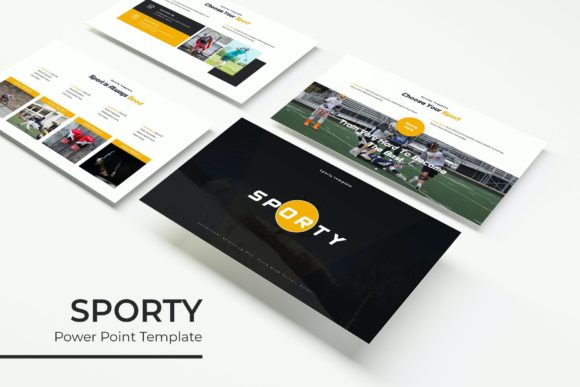
This isn't just another set of static backgrounds. It is a comprehensive design system built for modern visual communication. The "Sporty" aesthetic here doesn't necessarily mean you have to be presenting about athletics; rather, it refers to a dynamic, energetic, and fluid design language. It is about movement, clarity, and high-contrast visuals that keep an audience awake and engaged. With a massive library of over 150 total slides and five premade color themes, this template kit is designed to solve the problem of visual monotony. Whether you are building a brand identity, pitching a packaging design, or creating a marketing roadmap, the structure provided here allows you to focus on storytelling rather than formatting.
Visual Versatility: Beyond the Standard Slideshow
One of the standout features of this package is the sheer volume of content included. We are looking at 5 Keynote files and 5 Widescreen files, all built on master slides. This is crucial for anyone serious about visual consistency. Because the graphics are based on master slides, you can make global changes to fonts or colors without having to click through every single page. It ensures that your brand identity remains intact throughout the presentation.
The five premade color variations are particularly useful. Often, templates come in a single garish shade that clashes with a client’s logo. Here, you get 30 slides dedicated to each color scheme. This variety allows you to match the template to specific branding guidelines instantly. For a content creator or graphic designer, this means you can repurpose the same template for different clients simply by switching the color file, saving hours of production time.
Furthermore, the inclusion of handcrafted infographics is a game-changer for data visualization. Standard charts in PowerPoint often look dated or clunky. These custom infographics allow you to present complex data—like market share, user growth, or workflow processes—in a way that feels like editorial design. It bridges the gap between a boring corporate report and a visually compelling story.
Practical Applications for Modern Brands
Let’s talk about real-world usage. A common mistake in web design and marketing is thinking that presentations are only for boardrooms. In reality, a slide deck is a versatile design asset. Here is how you can leverage the features of this template across different mediums:
- Social Media Graphics: You don't always need Photoshop to create an Instagram carousel. You can design individual slides within the template, use the picture placeholder features to drag and drop your images, and export them as high-res PNGs. The pixel-perfect illustrations ensure your graphics look sharp on Retina screens.
- Pitch Decks for Packaging Design: If you are a designer presenting a new packaging design concept, the gallery and portfolio slides are essential. They provide a clean frame for your mockups, allowing the product to shine without distracting background noise.
- Internal Brand Guides: Use the section break slides to divide chapters of a brand style guide. You can dedicate sections to typography, color codes, and tone of voice, creating a cohesive brand identity document that looks professional.
- Digital Products & E-books: For entrepreneurs selling knowledge, a PowerPoint file can be converted into a PDF lead magnet. The modern typography and structured layouts make your content look like a premium digital product worth paying for.
The resizable and editable graphics mean you aren't locked into a specific layout. If you are working on poster design or print materials, you can scale the vector elements up without losing quality. This flexibility is vital for creative entrepreneurs who need their assets to work across multiple platforms—from a website banner to a physical flyer.
Streamlining Your Workflow with Smart Design
Efficiency is the currency of the modern small business owner. The "Drag & Drop" functionality mentioned in the template features isn't just a buzzword; it refers to the picture placeholder system. Instead of fiddling with image cropping and alignment, you simply drag your photo onto the designated area, and the template handles the rest. This is particularly helpful for bloggers and marketers who need to update visuals frequently based on new campaigns or content calendars.
Another critical component is typography. The package includes a Readme First file with a free font download link. Typography is often the silent killer of design; using the wrong serif font or sans serif font can make a presentation look amateurish. By providing the specific font files used in the design, the template ensures that your readability remains high and the aesthetic remains true to the original concept. Good font pairing is already done for you, balancing headings and body text to guide the viewer's eye naturally.
When selecting your slides, consider the flow of information. Use the section break slides to signal a shift in topic—this helps with audience retention. Use the portfolio slides to provide visual proof of your work. The structure provided by the Sporty PowerPoint Template acts as a guide rail, preventing you from overloading slides with text, which is a common pitfall in presentation design.
Maximizing Impact and Engagement
The goal of any visual communication is engagement. A static wall of text will lose your audience in seconds. The "Sporty" nature of this template encourages the use of white space and bold imagery. It forces you to be concise. When you use a template with handcrafted infographics, you are compelled to turn paragraphs of text into visual data points. This makes your message more digestible and memorable.
For those in marketing or advertising, the ability to create a visually stunning deck quickly means you can spend more time refining your message. You aren't wasting hours trying to align shapes or find the right hex code. The master slides handle the heavy lifting, allowing you to focus on strategy.
Keep in mind the commercial licensing. Since the photographs in the preview are for illustration purposes only, you have the freedom to populate the slides with your own high-quality imagery. This is actually better for brand recognition. Stock photos can feel generic, but images of your actual team, products, or services build trust with your audience.
Ultimately, this template is a tool for professionals who value their time and their visual reputation. Whether you are a hobbyist creating a portfolio to land your first client or a seasoned brand strategist presenting to a Fortune 500 company, having a robust, premium font and slide system in your toolkit is non-negotiable. It’s about looking the part so you can play the part. By utilizing the pixel-perfect illustrations