Legato: The Ultimate PowerPoint Template for Dynamic Presentations
Ever sat through a presentation where the slides felt disconnected, cluttered, or just plain boring? You know the ones—where the speaker’s brilliant ideas get lost in a sea of mismatched fonts, blurry images, and chaotic layouts. It’s frustrating, right? A great presentation deserves a visual framework that matches its energy, clarity, and professionalism. That’s exactly where a well-crafted template system can transform your workflow and your results.
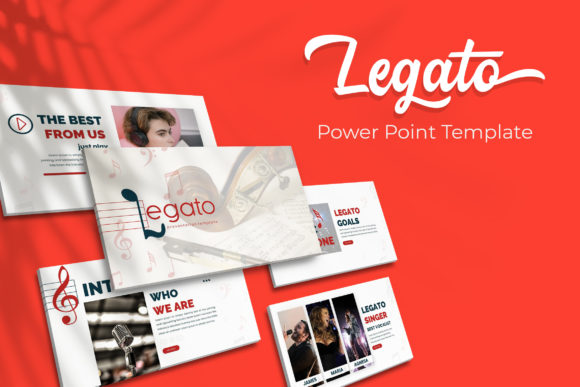
Imagine having a library of over 150 meticulously designed slides at your fingertips, ready to adapt to any topic or audience. The Legato PowerPoint Template isn’t just another download; it’s a comprehensive design toolkit built for real-world use. Whether you’re pitching a new client, launching a product, teaching a workshop, or sharing quarterly reports, having a consistent, polished visual language instantly boosts your credibility. It lets your content shine without the design getting in the way.
Beyond Basic Slides: A Cohesive Design Ecosystem
What sets a premium template apart from a basic one? It’s the attention to detail and the understanding of how professionals actually work. Legato provides five distinct premade color schemes, each containing 30 unique slides. This isn’t about just changing a background color. Each color variation is thoughtfully curated to evoke a different mood or suit different brand guidelines, from bold and energetic to clean and corporate. Having these ready-made palettes saves hours of guesswork and ensures every slide within your deck feels harmonious.
The real power lies in the structure. Built on master slides, every element is pixel-perfect and fully editable. This means when you update a logo, change a font, or adjust a color on the master, it cascades through your entire presentation. No more hunting down that one rogue text box on slide 47. The consistency this provides is invaluable for maintaining a strong brand identity across all your communications. You’re not just making a single presentation; you’re building a reusable asset that aligns with your broader visual strategy.
Practical Tools for Real-World Scenarios
Let’s talk about those handcrafted infographics. Data visualization can make or break a presentation. Generic, clip-art-style charts often look cheap and fail to communicate complexity effectively. Legato includes thoughtfully designed infographic elements that help you present statistics, processes, timelines, and comparisons in a way that’s both beautiful and easy to understand. This is crucial for keeping your audience engaged and helping them retain key information. A well-designed diagram can explain a complex concept in seconds.
Another standout feature is the inclusion of dedicated section break slides and gallery/portfolio slides. Section breaks provide a clean, professional pause between topics, helping your audience mentally reset and follow the narrative arc of your presentation. Gallery slides are perfect for showcasing work, team members, products, or case studies. The built-in picture placeholders with drag-and-drop functionality mean you can insert your images effortlessly, and they’ll automatically crop to fit the designated space perfectly. This eliminates the tedious resizing and cropping that eats up so much preparation time.
Who Benefits Most from This Template System?
The versatility of this system makes it a game-changer for a wide range of professionals. For small business owners and entrepreneurs, it’s about presenting your venture with the polish of a much larger company. When you’re pitching to investors or potential partners, a sleek, professional deck communicates seriousness and attention to detail. It helps build trust before you even say a word.
Marketers and content creators will find it indispensable for creating social media graphics, webinar slides, and internal strategy decks. The ability to quickly adapt slides for different platforms—like extracting a single infographic for Instagram or a key quote for a blog post—streamlines content production. The consistent aesthetic reinforces your brand across every touchpoint, from a live presentation to a LinkedIn post.
Designers and agencies can use Legato as a powerful starting point for client projects. Instead of building every presentation from scratch, you have a robust, customizable foundation that can be tailored to any client’s brand guidelines. This efficiency allows you to focus on the strategic content and storytelling, which is where your true value lies.
Maximizing Your Investment: Tips for Effective Use
Getting the most out of any design asset requires a bit of strategy. First, don’t feel locked into the premade color schemes. Use them as a starting point, but take the time to input your exact brand colors using the HSL or RGB values from your style guide. This personalization is what will make the template truly yours.
Next, play with the master slides. This is where the real customization happens. Add your logo to the footer, adjust the default font styles to match your brand’s typography, or tweak the layout guides. Setting this up once at the beginning means every new slide you create will automatically carry your brand’s DNA.
When it comes to the included graphics and icons, remember they are fully resizable and editable. Don’t just drop them in as-is. Change their colors to match your palette, combine them in new ways, or use them as subtle background elements. Think of them as raw materials for your unique visual story. The key is to use the template’s strengths as a springboard for your creativity, not a cage that limits it.
The Final Slide: A Foundation for Better Communication
Ultimately, a tool like the Legato PowerPoint Template is about removing friction from the creative process. It handles the heavy lifting of layout, alignment, and visual harmony, freeing you up to focus on what truly matters: your message, your story, and your connection with the audience. It’s a practical solution for anyone who needs to communicate ideas visually, whether in a boardroom, a classroom, or a virtual conference. By investing in a quality presentation system, you’re investing in your ability to inform, persuade, and inspire more effectively.