Lunarlon: A Dynamic Template for Your Next Presentation
Imagine this: you’ve spent weeks perfecting your business pitch, refining your marketing strategy, or outlining a complex new project. You know the content inside and out. But when it comes to creating the slide deck, you hit a wall. The default templates feel generic, the layouts are uninspired, and the thought of building a polished, professional presentation from scratch is exhausting. This is where the right design asset becomes a game-changer, transforming a simple collection of slides into a compelling visual story.
More Than Just Slides: A Visual System for Your Brand
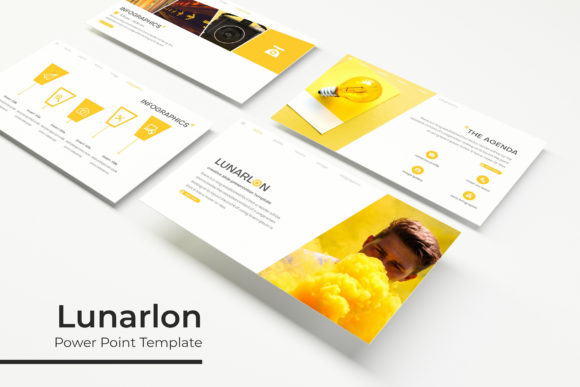
The Lunarlon PowerPoint Template isn't just another set of pre-made slides. It's a comprehensive visual system designed to bring clarity, professionalism, and a distinct personality to your presentations. At its core, it offers a staggering 150+ total slides, ensuring you have a versatile layout for any type of content, from dense data points to impactful, image-driven narratives. The true power, however, lies in its thoughtful structure and cohesive design language, making it an indispensable tool for anyone who regularly communicates ideas visually.
What immediately sets it apart is the provision of five premade color palettes. This isn't about simply changing the accent color on a few charts. Each of the five variations is a fully realized theme, with 30 unique slides meticulously designed to work within that specific color story. This feature is a direct answer to a common branding challenge: maintaining visual consistency. Whether your brand identity is built on bold, energetic hues or soft, sophisticated tones, you can select the theme that aligns perfectly, ensuring every presentation reinforces your professional image.
A Toolkit for Real-World Communication
Think of your presentation as a key touchpoint in your audience's journey with your brand. A cohesive and professional deck builds trust and enhances brand recognition. The Lunarlon template facilitates this through its pixel-perfect illustrations and handcrafted infographics. These aren't generic clipart elements; they are custom-designed graphics that explain processes, showcase data, and break up text in a visually engaging way. When you use these assets consistently across your presentations, you create a recognizable visual shorthand for your audience, strengthening your brand's presence in their minds.
The practicality extends to every slide. The inclusion of resizable and editable graphic picture placeholders is a nod to the real-world workflow of designers and content creators. Instead of wrestling with alignment and sizing, you can simply use the drag-and-drop functionality based on master slides to insert your own images. This saves immense time and ensures a polished, "pixel-perfect" look every single time, even for those with limited design experience. The gallery and portfolio slides are particularly useful for creatives, agencies, and freelancers looking to showcase their work in a clean, professional format that lets the visuals speak for themselves.
From Boardroom to Browser: Practical Applications
The versatility of a well-structured template like this extends far beyond the conference room. Consider the needs of a small business owner or a marketing professional. The same visual system used for a quarterly review can be adapted to create a stunning social media graphics campaign. By extracting key slides or elements, you can design consistent Instagram carousels, Facebook ad visuals, or LinkedIn infographics that carry the same professional weight as your formal presentations. This approach is a cornerstone of effective brand identity management, ensuring a unified look across all platforms.
For entrepreneurs and bloggers, the template becomes a foundation for a wide array of digital products and marketing assets. You could use the layouts to design a compelling lead magnet PDF, an ebook, or a workshop workbook. The section break slides are perfect for creating clear chapters in a longer document, while the infographic elements can simplify complex information for your audience. The ability to customize everything means the template adapts to your project goals, not the other way around. It’s a creative font for your ideas, providing the structure and style you need to communicate effectively.
Choosing and Pairing for Maximum Impact
While the Lunarlon template provides a complete visual package, the included typography plays a crucial role in its overall appeal. The fonts used are selected for their modern, clean aesthetic, ensuring high readability on screens of all sizes—a critical consideration for any digital or web design project. When you download the template, you'll find a "Readme First" file with a link to download the free fonts used. This is a vital detail, as it allows you to install the exact typefaces on your computer, ensuring your edits maintain the template's intended look and feel.
A key piece of practical advice is to always test your font pairings. The template likely pairs a strong sans-serif for headlines with a highly legible serif or sans-serif for body text. If you decide to introduce your own brand's typeface, do so thoughtfully. The goal is to maintain visual harmony. Consider the personality of your chosen font—does a bold, modern sans-serif match your brand's innovative spirit? Does a classic serif convey tradition and reliability? The template provides a solid typographic foundation, but understanding these principles will help you make customizations that truly elevate your designs.
Getting Started and Making It Your Own
Upon downloading the Lunarlon package, you’ll find it thoughtfully organized. You receive five PPTX files, one for each color variation, available in both standard and widescreen formats. This foresight ensures your presentation looks perfect on any screen or projector. The master slide functionality is the engine behind the template's efficiency. By editing elements on the master slide, you can make global changes to fonts, colors, and logos across all 30 slides in a theme instantly. This is how you achieve true visual consistency without hours of manual work.
It's important to note a standard but crucial disclaimer found in most design assets: the photographs and pictures used in the preview are for illustration purposes only and are not included in the download. This is because licensing for stock photography is separate. However, the picture placeholders are expertly designed, making it simple to insert your own high-quality images that are directly relevant to your content and brand. This practice of using your own visuals is always recommended, as it adds authenticity and reinforces your unique brand story.
Ultimately, a resource like the Lunarlon PowerPoint Template is an investment in clear communication and professional presentation. It provides the design assets, structural integrity, and customizable flexibility needed to create presentations that are not only informative but also visually compelling and on-brand. For the designer, the marketer, the entrepreneur, or the hobbyist ready to share their ideas with the world, it offers a powerful starting point to build from, ensuring your next presentation captures attention for all the right reasons.