Master Your Workflow with Collabry Task & Workflow Management Dash
Juggling multiple projects, deadlines, and team communications often feels like trying to solve a puzzle while the pieces keep moving. The constant switching between spreadsheets, chat apps, and email threads fragments focus and drains energy that could be better spent on actual creative or strategic work. A centralized command center isn't just a luxury; it's a necessity for anyone serious about productivity and clarity in their operations. This is where a thoughtfully designed dashboard template becomes an invaluable asset, transforming chaos into a structured, visual narrative of your work.
A Visual Command Center for Clarity and Control
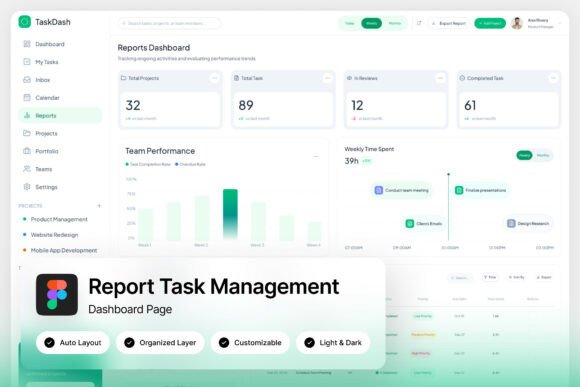
The Collabry Task & Workflow Management Dashboard is more than just a collection of charts and lists; it's a professionally crafted UI template designed to bring immediate order to complex workflows. Its modern, pixel-perfect layout is built with productivity in mind, offering an organized view of tasks, timelines, team performance, and project health at a glance. The design avoids unnecessary ornamentation, focusing instead on clean lines, intuitive data visualization, and ample white space that reduces cognitive load. This isn't about making work look pretty—it's about making information digestible and actionable, which is a critical component of effective brand identity for any software or platform.
From Template to Tailored Platform: Practical Applications
While designed as a foundational template, its true value lies in its adaptability. For a small business owner or entrepreneur, it serves as the perfect starting point for a custom internal tool. Imagine tailoring the color scheme and modules to reflect your company's branding, creating a cohesive environment for your team. For designers and agencies, this template is a rapid prototyping powerhouse. You can quickly mock up a client-facing project management interface, demonstrating functionality and layout with a high-fidelity Figma file rather than just wireframes, which significantly streamlines the approval process.
The applications extend beyond internal tools. A content creator or marketer could adapt the dashboard layout for a public-facing "project tracker" for a community or membership site, building transparency and engagement. The structured grids and data cards are also excellent for designing editorial layouts for reports or digital products, where presenting information clearly is paramount. The included light and dark mode interfaces offer flexibility for different user preferences and environments, a thoughtful detail that enhances user experience.
Design Choices That Drive Productivity
Several specific design elements make this template particularly effective. The well-organized, named, and grouped layers in the Figma file are a gift to any designer or developer. This meticulous organization drastically cuts down on the time needed to locate and modify elements, allowing you to focus on customization rather than hunting through a messy file. The use of free Google Fonts ensures that typography is accessible, easy to implement, and consistent across all devices and browsers—a crucial factor for web design and maintaining visual consistency.
The resolution of 1440×1024 px is a practical choice for modern desktop displays, ensuring the design looks sharp and detailed during presentations and development. When you're presenting a concept to a stakeholder or a client, that pixel-perfect layout communicates professionalism and attention to detail, directly impacting brand recognition and trust. It moves the conversation from "what it could look like" to "this is exactly what the user will see."
Streamlining the Path from Idea to Implementation
One of the biggest hurdles in designing functional interfaces is bridging the gap between aesthetic vision and technical reality. This template is built to be fully customizable with easy editing, meaning you can adjust the color palette to match a client's brand guidelines, swap out icons, or reconfigure the layout of cards and charts without breaking the underlying structure. This ease of editing empowers creative entrepreneurs and hobbyists alike to experiment and iterate quickly.
The package includes a Help Guide (.pdf) and Font Links (.txt), which are practical resources that smooth the onboarding process. Instead of guessing how to use a component, you have a reference, saving valuable time. For those building a marketing asset or a commercial font presentation, the ability to rapidly customize and deploy a professional-looking interface can be a game-changer for project timelines and client satisfaction.
Considerations for Your Next Project
When incorporating a template like this into your work, think about the specific needs of your audience. Is the primary goal for quick data scanning? Ensure the most critical metrics have the highest visual prominence. Is it for project planning? Make sure the timeline and task list views are exceptionally clear. Test the font pairing—the template's foundation is strong, but you might want to introduce a complementary display font or a more specialized serif font for headers to inject more personality into your brand's version.
Always review the licensing for any assets you use. While the fonts included are free, if you're creating a final product for a client or for sale, it's your responsibility to ensure all elements comply with commercial use terms. This due diligence is part of maintaining a professional reputation. Ultimately, a resource like the Collabry dashboard template is a powerful springboard. It provides the sophisticated, organized structure so you can invest your creative energy into the unique customization that makes a tool, product, or platform truly yours and resonant with its intended users.