Mastering Project Clarity with the TaskDash Dashboard
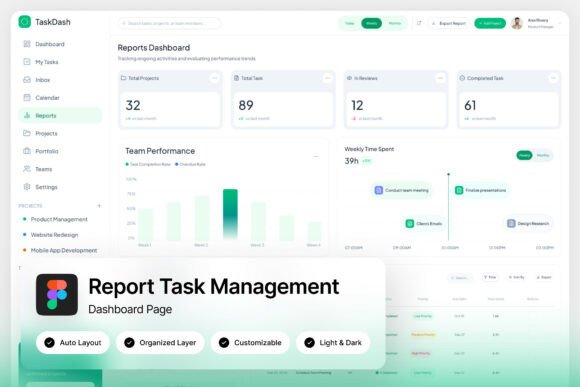
Let’s be honest: most project management tools feel like they were designed by engineers, for engineers. They’re packed with features but wrapped in a confusing maze of menus and cluttered interfaces. The result? Your team spends more time navigating the software than actually getting work done. This is precisely the problem the TaskDash Workspace Dashboard was built to solve. It’s not just another admin panel; it’s a visual command center designed for human clarity. Imagine opening your laptop in the morning to a screen that doesn’t overwhelm you, but instead presents a calm, structured, and immediate overview of everything that matters. That’s the core appeal here—it transforms data into a story you can actually read at a glance.
A Visual Philosophy Built on Breathing Room
The first thing you notice about this dashboard is its commitment to a light and airy layout. In a digital landscape saturated with dark-mode everything and aggressive neon accents, TaskDash takes a more sophisticated approach. The use of whitespace isn’t accidental; it’s a functional tool. By giving elements room to breathe, the interface reduces cognitive load. Your eyes aren’t darting around trying to decipher a chaotic chart; they are guided smoothly from the project progress charts to the team workload summaries. The pixel-perfect layout ensures that whether you are viewing deadline panels or task completion trackers, every element aligns with geometric precision. This isn't just about looking pretty; it's about creating a visual hierarchy that prioritizes your attention. If you are building a SaaS product or a productivity app, this design language tells your users that you respect their time and value their focus.
From Admin Panel to Brand Asset
For designers and product teams, the utility of a dashboard extends far beyond its functional capabilities. A high-quality admin interface is a powerful brand identity asset. Think about it: the dashboard is the environment where your power users spend 80% of their time. If that environment feels disjointed or outdated, it reflects poorly on your entire product. TaskDash offers a modern typography foundation that supports your brand’s voice without shouting over it. The inclusion of Free Google Fonts means you aren't locked into expensive licensing for basic legibility, allowing you to maintain visual consistency across your marketing site and your internal tools. Whether you are a startup launching a new project management tool or an agency building a custom portal for a client, having a premium font and a clean UI ready to go saves weeks of design iteration. It bridges the gap between a functional prototype and a polished, market-ready product.
Practical Applications for the Modern Creator
While the primary use case is project management, the versatility of the TaskDash design system makes it a valuable asset for a variety of creative workflows. It’s not just for assigning tasks; it’s about presenting information effectively.
- Client Reporting: Use the project progress charts as a visual asset in your monthly PDF reports. Instead of exporting raw data from Excel, you can screenshot or adapt these clean graphs for editorial layouts and print materials.
- SaaS Marketing: If you are selling software, you need high-quality screenshots for your landing pages. The unique, stylish, and modern design of these screens serves as perfect mockup material for social media graphics or web design hero sections.
- Internal Documentation: For small business owners, creating a sense of organization is half the battle. Using a structured visual language for internal wikis or SOPs helps improve readability and ensures your team actually reads the documentation.
- Presentation Design: The 1440×1024 px resolution screens are ideal for widescreen presentations. You can drop these layouts into Keynote or PowerPoint to create professional status updates that impress stakeholders.
Customization That Respects Your Workflow
One of the biggest hurdles with downloading design assets is the "black box" effect—where you get a file that is impossible to edit. TaskDash avoids this trap by offering fully customizable with easy editing capabilities. The file structure is built with well-organized, named, and grouped layers, which is a massive time-saver. You don’t have to hunt through a mess of "Rectangle 47" layers to find the background color. This level of organization is crucial for design assets because it allows you to adapt the tool to fit specific font pairing strategies. Perhaps you want to swap the sans-serif headers for a script font to give a specific project a more personal touch, or maybe you need to toggle the Light and Dark mode interface to match your app’s native settings. Because the files are delivered as a Figma file (.fig), you have total control. You can reshape the team workload summaries to fit a mobile viewport or expand the deadline panels for a wider monitor without breaking the design.
Designing for Decision Making
Effective design is ultimately about decision-making. A good dashboard should help a user decide what to do next, not just show them what has happened. The layout of TaskDash excels in this regard by balancing data density with aesthetic appeal. It proves that you don’t need to sacrifice beauty for utility. For content creators and marketers, this is a lesson in professional presentation. When you present your work—whether it’s a packaging design proof or a website mockup—the way you frame the information influences how it is received. A cluttered presentation suggests a cluttered mind; a clean, structured presentation suggests competence and control. By utilizing the principles found in this dashboard—clear typography, logical grouping, and ample spacing—you can improve audience engagement across your own projects. It serves as a masterclass in how to organize complex information so that it feels manageable and actionable.
Ultimately, the TaskDash Workspace Dashboard is more than just a collection of screens; it is a toolkit for clarity. Whether you use it directly for managing your team’s workflow or deconstruct it to learn how to build better interfaces for your own digital products, it provides a solid foundation. It strips away the noise and focuses on what matters: seeing the big picture and the details simultaneously. For the creative entrepreneur or project manager looking to streamline their visual communication, this is a step toward a more organized and productive future.