Mastering Time and Style with the 2022 Planner Design
There is a distinct satisfaction in flipping the page of a brand-new planner, seeing a blank grid waiting to be filled with meetings, goals, and daily to-dos. For designers, the challenge isn't just filling the dates; it is creating a visual system that organizes time without causing visual fatigue. When you are tasked with designing a yearly organizer for a client or your own brand, the technical specifications are just as critical as the aesthetic choices. A well-structured Calendar 2022 Planner Design serves as the backbone for productivity, requiring a delicate balance between whitespace, typography, and layout precision. It is not merely about listing days; it is about creating a functional piece of art that users interact with every single day.
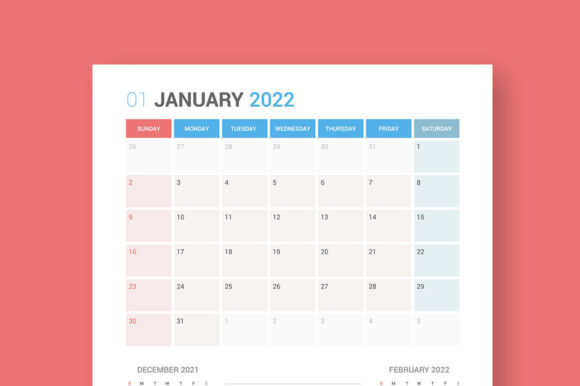
The specific design we are looking at today is a masterclass in structured organization. It is built on a substantial 6250x6250 pixel canvas (measuring 53x53 cm or 21"x21"), offering a massive square format that provides ample room for detailed scheduling. This high-resolution approach ensures that whether the planner is printed as a poster-sized wall calendar or downsized for a desk pad, the lines remain crisp and the text sharp. The square shape is particularly versatile in modern editorial design, fitting well into social media grids (like Instagram) and offering a balanced aesthetic that rectangular formats sometimes struggle to achieve.
The Sunday-Start Advantage and Structural Details
One of the defining features of this specific Calendar 2022 Planner Design is the week starting on Sunday. While Monday-start planners are common in corporate environments, the Sunday start remains a favorite for many families, freelancers, and personal planning enthusiasts. It allows users to visualize the upcoming week’s social and family events alongside the work week, or to separate the "weekend" mindset from the "work" mindset. For designers creating planners for the North American market, this is often the default requirement.
Beyond the start date, the structural integrity of the files is impressive. The package includes 12 months separated files, which is essential for modularity. Instead of one massive, unwieldy file, you get individual control over January through December. This is particularly useful for print materials and digital products where you might only need to edit a specific quarter or update a single month’s layout. Furthermore, each monthly file includes the previous and next months in small calendars. This is a standard of high-end premium font and design usage, ensuring users can plan transitions between months without losing context.
Typography that Works: The Roboto Family
A calendar is only as good as its readability. If a user struggles to read the date or the note lines, the planner fails its primary function. This design utilizes the Roboto Family, a sans serif font that has become a titan of modern typography. Originally designed by Christian Robertson for Android, Roboto is known for its mechanical skeleton and largely geometric forms, yet it features friendly and open curves.
Using Roboto in a planner is a strategic choice for brand identity. It is incredibly neutral. It doesn't scream for attention like a script font or a heavy display font; instead, it recedes into the background, allowing the content—your schedule—to take center stage. Its high readability makes it perfect for small text sizes, such as the tiny date numbers found in the "previous/next month" sections. For a small business owner or content creator, using a typeface like Roboto ensures that the final product feels professional and accessible to a broad audience.
Practical Applications for Designers and Brands
The versatility of this asset extends far beyond a simple desk calendar. Because the files are provided in AI, EPS, JPG, and SVG formats, the design potential is limitless. The vector formats (AI and EPS) are fully editable, allowing you to manipulate anchor points, change color schemes, and swap out fonts if necessary, though the Roboto selection is already optimized for performance.
Here is how different creative professionals can leverage this Calendar 2022 Planner Design:
- Branding and Corporate Identity: Companies often produce branded calendars as year-end gifts. You can take this template, apply the company’s color palette, and insert their logo into the header area. The square shape works exceptionally well for modern office decor.
- Social Media Graphics: The 6250x6250 resolution is overkill for web, but it allows for massive cropping flexibility. You can create a series of "Plan Your Month" Instagram posts or Pinterest graphics by cropping specific sections of the high-res file.
- Merchandise and Print-on-Demand: Think beyond paper. This layout could be adapted for poster prints, mousepads, or even tote bag designs. The SVG format ensures the lines remain sharp regardless of the merchandise size.
- Digital Planning (iPad/Tablet): By using the PDF or image versions of these files, you can create hyperlinked digital planners for apps like GoodNotes or Notability. The fully editable nature of the source files allows you to create interactive elements.
- Editorial Layouts: If you are designing a magazine or a business report, including a monthly overview is a common requirement. Having these 12 separate, pre-designed months saves hours of layout time.
Customization and File Formats
The inclusion of AI (Adobe Illustrator) files is the gold standard for design assets. It means you have complete control over the vector paths. If the current grid spacing feels too tight for your handwriting, you can adjust it. If the "Sunday" header needs to be capitalized differently, you can edit it instantly. The EPS format ensures compatibility with older software or alternative vector editors like CorelDRAW or Affinity Designer.
The JPG files are ready for immediate use in digital environments where editing isn't required—perfect for quick inserts into presentations or blogs. The SVG files are particularly valuable for web design, as they are lightweight and scale infinitely without pixelation, making them ideal for responsive websites.
Matching Typography to Project Goals
While the template comes with the Roboto Family, understanding why it works helps you if you decide to customize. When designing for branding or packaging, the goal is usually clarity. Roboto is a workhorse sans serif font. If you were designing a planner for a luxury fashion brand, you might swap the headers for a serif font to add elegance, keeping the dates in Roboto for legibility. This practice of font pairing—mixing a display typeface with a utility typeface—is a hallmark of professional visual communication.
Commercial Licensing Considerations
Before finalizing any project, whether it is for a client or a commercial font application, always review the licensing. Since this is a design asset package, the license typically covers the design layout, but if you plan to sell the digital planner files as a product, ensure the license permits redistribution. For internal use, client work, or print production, standard licenses usually suffice. This attention to legal detail is what separates a hobbyist from a professional creative entrepreneur.
Ultimately, a well-executed calendar design is a tool for empowerment. It brings order to chaos. By utilizing a structured, high-resolution, and professionally typeset template like this one, you save time while delivering a product that looks polished and functions flawlessly. Whether you are printing it out for your studio wall or packaging it as a digital download for your audience, the combination of the square format, Sunday-start grid, and the reliable Roboto typeface creates a winning formula for 2022.