Dexterus Google Slides: 150+ Slides for Polished Presentations
Imagine this: You're preparing a crucial pitch deck for investors, a workshop for clients, or a keynote for a conference. The content is solid, your points are sharp, but the visual presentation feels disjointed, generic, or simply uninspired. This common scenario is where a thoughtfully crafted asset like the Dexterus Google Slide Template moves from being a nice-to-have to a genuine workflow accelerator. It’s not just about having slides; it’s about having a cohesive visual system that communicates professionalism and clarity from the first click.
Beyond Basic Slides: A Visual System for Cohesive Storytelling
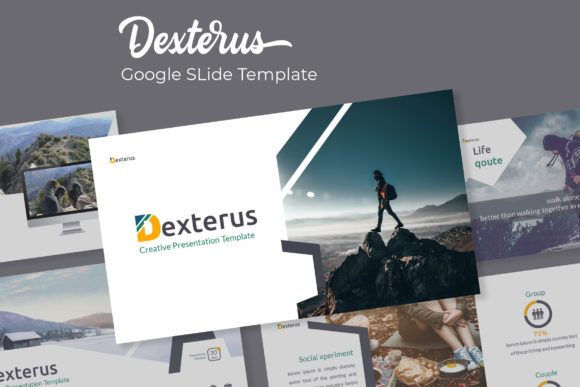
Dexterus presents itself as more than a collection of layouts. With 150+ total slides organized across five premade color variations—each containing 30 meticulously designed slides—it offers a structured framework for visual storytelling. The inclusion of handcrafted infographics and dedicated section break slides is particularly valuable. These elements transform data-heavy or complex ideas into digestible, engaging narratives, which is crucial for audience retention. For a small business owner creating a funding proposal or a marketer outlining a quarterly campaign, these pre-designed infographics eliminate the guesswork and time spent building charts from scratch, ensuring your data looks as compelling as your argument.
The practical design features speak directly to efficiency and brand consistency. The resizable and editable graphics, coupled with intuitive picture placeholders that allow for simple drag-and-drop functionality, mean you’re not fighting the template—you’re working with it. Built on master slides, every element you change globally updates across your presentation, guaranteeing that fonts, colors, and layouts remain pixel-perfect. This is a foundational requirement for maintaining a professional brand identity across multiple decks, ensuring that whether you're presenting to your team or the public, your visual language remains uniform and recognizable.
Practical Applications: From Pitch Decks to Digital Products
The true test of a design asset lies in its versatility. Consider how a template system like Dexterus applies across different professional scenarios. For an entrepreneur, the five distinct color themes offer a quick way to tailor presentations to different audiences—a sleek, dark theme for a tech-focused pitch versus a vibrant, colorful option for a creative workshop. The portfolio and gallery slides are a direct solution for designers, photographers, or consultants who need to showcase work samples without extensive design overhead. You can simply drag and drop your best work into the placeholders, creating a visually impressive case study in minutes.
For content creators and bloggers, the template becomes a dynamic tool for repurposing content. A well-structured blog post can be transformed into a downloadable PDF guide or a webinar slide deck using the same visual style, reinforcing brand recognition across platforms. Marketing professionals will find the structured layouts ideal for creating clear, actionable reports and strategy documents that clients can easily follow. The included section break slides are perfect for separating chapters in a presentation, guiding your audience through your story with visual cues that prevent cognitive overload.
Even beyond traditional presentations, the assets included—like the pixel-perfect illustrations and editable graphics—can be repurposed for social media graphics or simple website visuals, providing a consistent aesthetic across your digital footprint. The key is recognizing that a robust template is a repository of design elements, not just a fixed slideshow.
Maximizing Your Investment: Practical Tips for Use
To get the most out of a template like Dexterus, approach it strategically. First, choose your color theme early. The five premade options are a fantastic starting point, but align one with your existing brand palette or the mood of your specific project. This initial decision sets the tone for the entire presentation. Second, leverage the master slides. Before adding your content, spend time on the slide master view to adjust the default fonts and colors if needed. This one-time setup ensures every new slide you create automatically adheres to your brand guidelines.
When working with the infographics and data slides, focus on clarity over complexity. The handcrafted designs are built to present information cleanly. Avoid the temptation to overcrowd them; let the visual structure guide you to highlight only the most critical data points. Furthermore, test your font pairings. While the template suggests fonts, ensure the typeface you use for body text is highly readable at various sizes, especially if your presentation will be viewed on screens of different qualities. The included readme file with free font download links is a critical resource—use it to maintain design integrity.
Finally, consider the licensing and your project's scope. The note that preview images are for illustration only is standard, but it underscores the importance of using your own high-quality photography or licensed stock imagery. This practice not only avoids legal issues but also makes your presentation genuinely unique to your brand. For commercial projects, always verify that your use of the template and its included assets aligns with the provided license terms.
The Role of Visual Consistency in Professional Communication
Ultimately, tools like the Dexterus Google Slide Template address a fundamental need in professional communication: the need for consistent, polished, and efficient visual output. In a landscape where attention is scarce, a disorganized or amateurish presentation can undermine even the most brilliant idea. A well-structured template provides the scaffolding for clear communication, allowing your message—not design distractions—to take center stage.
By reducing the friction in the design process, it empowers professionals to focus on their core message and strategy. Whether you're building a brand identity from the ground up, scaling your marketing materials, or simply seeking to present your ideas with greater confidence and clarity, investing in a comprehensive design system is a practical step toward achieving those goals. It’s about working smarter, not just harder, to ensure your visual communication consistently reflects the quality and professionalism of your work.