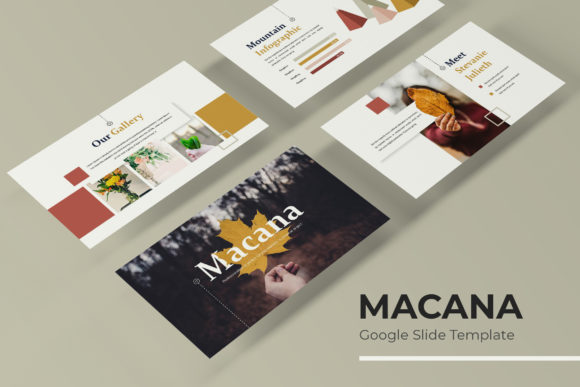
Macana Google Slides: A Template for Modern, Cohesive Presentations
You know the feeling. You have a brilliant idea, a crucial business update, or a stunning portfolio to share, but the mere thought of opening a blank presentation slide sends a wave of dread through you. Hours are spent wrestling with alignment, colors that don't quite match, and graphics that look amateurish. The final product often feels disjointed, undermining the very message you worked so hard to craft. This is where a thoughtfully designed template system changes the game, and the Macana Google Slides Template is built precisely for this purpose.
More Than Just Slides: A Visual Communication System
At first glance, Macana presents itself as a collection of over 150 slides. But its real value lies in its structured approach to visual storytelling. It’s not a random assortment of layouts; it’s a cohesive system. With five premade color schemes, each containing 30 meticulously crafted slides, you get a unified aesthetic right out of the box. This solves one of the biggest headaches for non-designers and busy professionals: color consistency. You pick a palette that resonates with your brand, and every single slide—from the title to the data visualization—automatically adheres to that scheme, creating a professional and harmonious look from start to finish.
The design philosophy centers on clarity and modern appeal. The handcrafted infographics are a standout feature. Instead of generic clip art, you’re working with custom charts, diagrams, and icons that feel intentional and polished. These aren't just decorative; they're functional tools for explaining complex processes, showcasing data, or breaking up text-heavy sections. The dedicated section break slides and gallery/portfolio layouts further demonstrate a focus on real-world application, giving you purpose-built frames for case studies, project showcases, or team introductions.
Practical Applications for Brands and Creators
Let's talk about how a template like this integrates into actual work. For a small business owner or entrepreneur, the Macana template becomes the backbone of your brand's visual communication. Use it to create investor pitches that command attention, sales decks that clearly articulate value propositions, or internal training materials that employees actually engage with. The pixel-perfect illustrations and picture placeholders with drag-and-drop functionality mean you can seamlessly integrate your own product photos, team headshots, or brand imagery without awkward cropping or distortion. This maintains brand recognition and presents a consistently professional image to every audience—clients, partners, or your own team.
Content creators and marketers will find it indispensable for streamlining workflow. Imagine preparing a series of social media graphics or a webinar presentation. The 150+ slides provide a vast library of options to keep your content fresh and visually interesting without starting from zero each time. The resizable and editable graphics based on master slides are a huge time-saver. Need to adjust the size of an icon or change the position of a text block? You do it once on the master slide, and the change propagates throughout your entire presentation. This ensures absolute visual consistency across dozens of slides, which is critical for reinforcing brand identity.
The utility extends far beyond traditional slide decks. Think of these layouts as starting points for other design assets. A beautifully structured slide can be repurposed into a stunning infographic for a blog post. The portfolio grid layouts are perfect for showcasing work on a website or in a digital brochure. The clean, modern typography and spacing provide an excellent framework for editorial layouts or even product packaging mockups. For anyone involved in print materials, from posters to invitations, the design principles embedded in Macana—balanced composition, thoughtful hierarchy, and elegant color palettes—offer a masterclass in effective visual communication.
Key Features That Enhance Your Workflow
Diving into the specifics, several features make this template particularly user-friendly and powerful. The foundation is built on master slides, which is the professional standard for presentation design. This structure allows for effortless global changes and ensures that every element you add aligns perfectly with the predefined style guides. You’re not just getting pretty slides; you’re getting a manageable design system.
The inclusion of five separate PPTX files for widescreen format is a practical touch. It means you can have multiple projects or brand variations open simultaneously without confusion. The "Readme First" file and the included free font download link are thoughtful additions that prevent the common frustration of missing fonts and broken layouts. It shows an understanding of the end-user's experience.
However, a crucial note for any commercial project: the photographs and pictures used in the template preview are for illustration only and are not included. This is standard practice, but it’s a vital reminder. Your final presentation will need to be populated with your own high-quality imagery to truly make it your own. This is where the picture placeholders shine—they guide you to insert your visuals in the most impactful way, ensuring the final result is both professional and uniquely yours.
Choosing the Right Tool for Your Visual Goals
When selecting any design asset, the key is to align it with your project's goals and your own workflow. The Macana Google Slides Template is ideal for those who value efficiency, consistency, and a modern, clean aesthetic. It’s particularly suited for professionals who need to produce high-quality presentations regularly but may not have the time or budget to commission a custom design for each one.
Before diving in, consider the personality of your brand. The five color variations offer different moods—from bold and energetic to subdued and professional. Choose the palette that best reflects your brand's voice. While the template provides the structure, your brand's unique assets (logo, custom graphics, photography) are what will ultimately bring it to life and ensure it stands out.
In essence, this template is less about a single flashy slide and more about providing a robust, adaptable framework. It handles the heavy lifting of design consistency, layout, and visual harmony, freeing you to focus on what truly matters: your content, your story, and connecting with your audience. For the designer, marketer, or entrepreneur, that’s the real value—a polished, professional starting point that respects both your time and your vision.