Marione Keynote Template: Build Presentations That Actually Look Professional
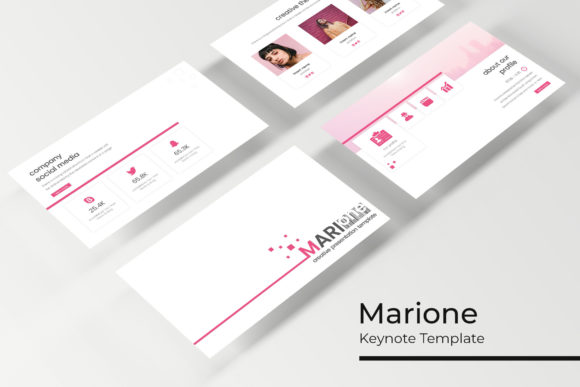
Let's be honest—most Keynote presentations look terrible. You open the default templates, drop in some bullet points, add a stock photo, and hope nobody notices the clip-art vibes. But here's the thing: your audience always notices. Whether you're pitching investors, presenting quarterly results, or launching a new product, the visual quality of your slides shapes how people receive your message. The Marione Keynote Template solves this problem without requiring you to hire a designer or spend hours tweaking layouts.
What makes this template collection worth your attention? It ships with over 150 total slides organized across five premade color themes, giving you 30 unique slide designs per color variation. That's enough variety to build multiple presentations without repeating a single layout. The handcrafted infographics alone save hours of work—charts, timelines, process flows, and data visualizations that actually communicate information clearly instead of just filling space.
Why Slide Design Matters More Than You Think
Think about the last presentation that genuinely impressed you. Chances are, the content was important, but the delivery sealed the deal. Clean typography, consistent color palettes, and well-organized layouts signal professionalism before you even speak. For small business owners and entrepreneurs, this matters enormously. A sloppy pitch deck can sink a funding round. A cluttered sales presentation can lose a client. The Marione Keynote Template gives you a visual framework that communicates competence and attention to detail—two qualities every audience values.
Brand consistency is another critical factor. When your presentations match your website, social media graphics, and printed materials, you build recognition. People start associating your visual style with your business. The five premade color variations included with this template make it straightforward to align slides with existing brand guidelines. Whether your identity leans bold and vibrant or minimal and muted, one of the five themes likely fits without modification. And if you need to adjust, everything is built on master slides, so changes propagate instantly across the entire deck.
Practical Uses Beyond the Conference Room
Most people think Keynote templates are only for formal presentations. That's a narrow view. The Marione collection works beautifully for portfolio showcases—the gallery and portfolio slides are specifically designed to display visual work cleanly. Photographers, designers, illustrators, and crafters can use these layouts to present projects to clients without building everything from scratch. The picture placeholders support drag-and-drop functionality, so swapping images takes seconds rather than minutes.
Marketing teams will find real value here too. Need to create a quick brand guidelines document? The section break slides provide natural dividers for different topics. Building a social media content calendar for your team? The infographic slides handle timelines and schedules with clarity. Presenting campaign results to stakeholders? The data visualization layouts handle charts and metrics without looking generic. Even bloggers and content creators can repurpose these slides as visual aids for video content or downloadable lead magnets.
The template also serves well for internal communications. Training materials, onboarding documents, and process guides all benefit from structured layouts. Instead of sending colleagues a wall of text in an email, you can present information in a format that's easy to scan and remember. The pixel-perfect illustrations included in the template add visual interest without feeling childish or off-brand.
Working Smarter with Master Slides and Editable Graphics
Here's where the Marione Keynote Template genuinely saves time. Every slide is based on master slides, which means your global design choices—fonts, colors, logo placement—update across the entire presentation automatically. Change your primary brand color once, and every slide reflects that change. This architecture prevents the common nightmare of manually editing 40 slides individually when a client requests a color swap at the last minute.
The resizable and editable graphics deserve special mention. Many templates lock you into fixed layouts where moving one element breaks everything else. These graphics are built to be flexible. Resize an infographic to fit a different section. Reposition a chart to accommodate additional text. The underlying structure adapts without falling apart. For anyone who's wrestled with rigid template files, this flexibility feels like a genuine upgrade.
Font pairing is handled thoughtfully as well. The template uses free fonts, and the included Readme file provides direct download links. This eliminates the frustrating experience of opening a purchased template only to discover it requires a $200 font family you didn't budget for. You download the fonts, install them, and everything renders exactly as previewed. The typography choices complement the overall aesthetic—modern, clean, and highly readable at projection sizes.
Getting the Most from Your Template Investment
Start by reviewing all 30 slides in your chosen color theme before building anything. Understanding the full range of layouts available prevents you from forcing content into inappropriate structures. That timeline infographic might work perfectly for your project roadmap, but if you never scroll past slide 10, you'll miss it entirely. Map your content to the available layouts first, then start assembling.
Pay attention to readability when presenting to larger audiences. The template's typography is designed for screen display, but you should still test your actual content at the size it will be projected. Short paragraphs outperform dense text blocks in presentation settings. The slide layouts encourage this naturally, but resist the urge to cram additional information into every available space.
Consider your audience's expectations. A creative agency pitch benefits from bold color variations and dynamic infographics. A financial report calls for the more restrained themes. The Marione Keynote Template provides enough range to serve both contexts, but selecting the right starting point matters. Don't default to your personal favorite—choose the variation that best serves your specific audience and objective.
Finally, remember that the photographs shown in template previews are for illustration purposes only and aren't included in the download. Have your own images ready, or source appropriate stock photography before you begin. The drag-and-drop picture placeholders make integration simple, but the visual impact of your final presentation depends heavily on the quality of images you supply. Invest a few minutes selecting strong visuals, and the template does the heavy lifting from there.
Five Keynote files, five widescreen variations, and five premade colors—that's the complete package. For designers building client decks, entrepreneurs preparing pitches, or marketers assembling campaign presentations, the Marione Keynote Template offers a practical foundation that looks polished without requiring advanced design skills. Sometimes the best creative tool is one that gets out of your way and lets you focus on the content that actually matters.