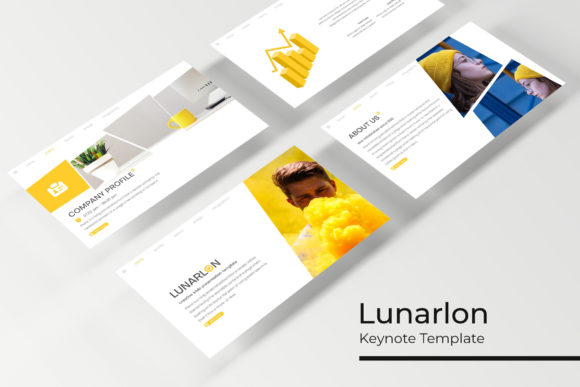
Designing with Impact: The Lunarlon Keynote Template
Struggling to make your next big presentation feel cohesive and visually powerful? You're not alone. Many professionals find themselves wrestling with generic slides, mismatched colors, and graphics that just don't communicate the quality of their ideas. The right design system can transform a mundane slideshow into a compelling narrative, and that’s precisely where a tool like the Lunarlon Keynote Template comes into focus.
A Visual System Built for Clarity and Style
What makes a presentation template truly useful isn't just a collection of pretty slides; it's a thoughtfully structured visual language. The Lunarlon template is built on this principle. With over 150 total slides organized into five distinct premade color schemes—each containing 30 meticulously designed slides—it offers a robust starting point for almost any project. This structure ensures visual consistency from the first title card to the final call-to-action, which is fundamental for brand recognition and professional presentation.
Beyond the color variations, the template's strength lies in its practical, handcrafted elements. The included infographics aren't just decorative; they're designed to simplify complex data, making information digestible and engaging for your audience. Section break slides provide clear visual cues that guide viewers through your narrative, while the gallery and portfolio slides offer clean, grid-based layouts perfect for showcasing work, case studies, or product imagery. This isn't just a set of slides; it's a comprehensive toolkit for visual storytelling.
From Boardroom to Brand Building: Real-World Applications
The true value of any design asset is measured by its versatility. Where can you put a template like Lunarlon to work? The applications extend far beyond a standard quarterly business review.
For entrepreneurs and small business owners, it's a powerful tool for investor pitches, product launches, and client proposals. The cohesive design immediately elevates your brand's perceived professionalism. Marketers and content creators can repurpose the slides to create stunning social media graphics, webinar decks, or online course materials that maintain a consistent brand identity. The pixel-perfect illustrations and resizable graphics make it simple to adapt elements for different platforms.
Consider its use in editorial and packaging design contexts. A food blogger could use the gallery slides to present a new cookbook layout, while a product designer might use the infographic sections to explain the features and materials of a new item. The clean, modern typography and balanced layouts provide a neutral yet stylish foundation that lets your own content and imagery take center stage. It’s equally effective for creating professional-looking internal training materials, workshop visuals, or detailed project timelines.
Practical Design Advice for Maximum Impact
Having a premium template is one thing; using it effectively is another. Here’s how to approach projects with a tool like this to get the best results.
Match the Mood to Your Message. The five premade colors are your first major decision. Don't just pick your favorite. Consider the psychological impact: a deep blue scheme conveys trust and stability, ideal for financial or tech presentations, while a vibrant coral might be perfect for a creative agency or lifestyle brand. Let the color palette support the story you're telling.
Master the Art of Typography. The template uses free, easy-to-download fonts, ensuring you won't hit licensing snags for commercial projects. A critical practice is to test your chosen font pairings directly in the slides. Use the provided sans-serif for clean, modern body text and the complementary display font for impactful headlines. Always prioritize readability—ensure there's enough contrast between text and background, and avoid overly ornate styles for large blocks of copy.
Leverage the Editable Graphics. The drag-and-drop picture placeholders and editable vector infographics are your best friends. Don't just drop in any photo. Curate imagery that aligns with your brand's color palette and aesthetic. Customize the infographic charts with your own data and brand colors to make them truly yours. This level of customization is what turns a template into a bespoke design system.
Think Beyond the Presentation. A key insight is to deconstruct the template. That beautifully designed section break slide could become a stunning hero image for a blog post. An infographic layout can be exported as a PDF lead magnet. The portfolio grid can inspire your website's gallery page. By viewing the Lunarlon Keynote Template as a library of design components rather than just a slideshow file, you unlock its full potential for creating a wide array of marketing assets and brand materials, ensuring visual consistency across all your touchpoints.