Effortless Style: Social Media Posts for Fashion Sales
Running a successful flash sale or seasonal promotion requires more than just great products; it demands immediate visual impact. For many entrepreneurs and designers, the bottleneck isn’t the merchandise itself, but the time it takes to create scroll-stopping content. If you have ever found yourself staring at a blank canvas, trying to align text and images while the clock ticks down to your launch time, you understand the struggle. A specialized design solution, such as a curated template bundle, can bridge the gap between a chaotic workflow and a polished, high-converting campaign.
The Anatomy of a High-Converting Campaign Visual
When you are pushing a time-sensitive offer, consistency is key, but so is variety. You cannot simply post the same image on your feed, in your stories, and on a website banner without looking repetitive or lazy. This is where the structure of a well-prepared design asset shines. Imagine having a toolkit specifically built for the 1:1 aspect ratio (1080x1080 pixels), which remains the gold standard for Instagram feeds and versatile enough for Facebook and Pinterest.
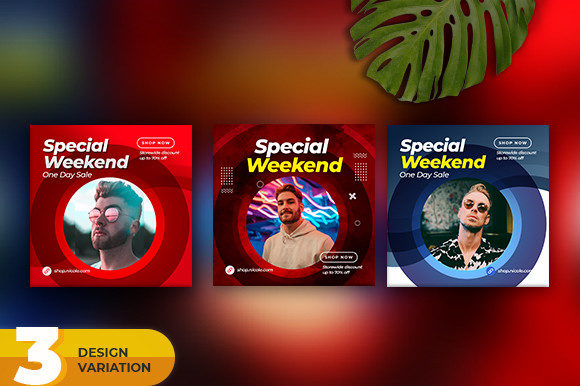
A robust collection typically includes multiple variations—such as three distinct layout styles—to keep your audience engaged without losing the thread of your branding. One variation might focus on bold typography for a "50% Off" shock factor, while another might prioritize high-quality imagery with subtle text overlays for a more editorial look. By utilizing Layered PSD files, you retain full control. You aren't just pasting a logo onto a static JPEG; you are working within a professional environment where shadows, lighting effects, and typography can be deconstructed and rebuilt to fit your specific aesthetic.
Practical Applications Beyond the Instagram Feed
While the primary use case for a social media post bundle is obvious, the utility of these design assets extends far beyond a single platform. A cohesive visual language is vital for brand recognition. Here is how you can leverage a high-quality template pack across various touchpoints in your business:
- Website Banners: While the native size is 1080x1080, these templates can often be adapted for website hero sections or sidebar ads, maintaining visual consistency between your social traffic and your landing page.
- Email Marketing: Embedding these visuals into your newsletters helps break up text and reinforces the urgency of the sale. A consistent look between the email and the social post builds trust.
- Digital Lookbooks: For designers or boutique owners, these layouts can serve as pages in a quick digital PDF catalog or lookbook, offering a structured way to present products.
- Physical Signage: Because the files are high-resolution (72 DPI is standard for web, but the pixel dimensions are high enough for small table-top prints), you can use them for in-store QR code posters or point-of-sale displays.
- Presentation Decks: If you are pitching to wholesale buyers or collaborating with influencers, using these styled slides can make your proposal look significantly more professional than standard PowerPoint templates.
Streamlining the Creative Workflow
Time is the most expensive resource for a creative professional. One of the most significant advantages of using a pre-designed bundle is the elimination of decision fatigue. You do not need to spend hours debating font pairings or grid layouts. The design work has been done by a professional who understands visual hierarchy.
However, a template is only as good as its flexibility. The inclusion of a free font file is a critical feature often overlooked. It ensures that you can replicate the exact look of the preview immediately upon opening the file, without scrambling to purchase or download additional assets. Furthermore, the RGB color mode ensures that what you see on screen is exactly how it will appear when uploaded to the web, preventing the dulling of colors that sometimes happens when converting from print-focused CMYK modes.
Customizing for Brand Identity
Generic templates can often feel "stock." The key to making a template work for your brand lies in the details. When working with a layered file, you have the opportunity to inject your brand's personality deeply into the design.
Start with the typography. If the template uses a bold, modern sans-serif, but your brand is built on a vintage, elegant aesthetic, you will need to swap the typeface. This is where understanding font pairing becomes essential. If you keep the layout but change the font, ensure the new typeface has a similar "x-height" and weight to maintain the visual balance the designer intended.
Next, look at the color palette. A fashion sale often implies urgency—reds, blacks, and whites are common. However, if you are a bohemian lifestyle brand, you might want to swap those high-contrast colors for muted earth tones or pastels. Because the file is layered, you can easily isolate background elements, text, and shape layers to apply your specific hex codes. Don't forget to swap out the placeholder imagery for your own high-quality product shots. The mockups in the preview are there to show you the potential, but the conversion happens when the customer sees your product.
Technical Considerations for Crisp Visuals
Nothing undermines a sale faster than blurry graphics or pixelated text. The technical specifications of a design bundle are the foundation of its quality. A size of 1080x1080 pixels is the industry standard for social media, ensuring that platforms like Instagram do not compress or crop your image awkwardly.
When you open the PSD file, pay attention to the layer organization. A well-organized file will have groups for "Text," "Images," and "Background Elements." This structure allows you to quickly turn layers on or off to create even more variations from a single file. For example, if a template includes a "New Arrival" badge, you might toggle that off and replace it with a "Best Seller" tag for a different campaign, effectively doubling your content output without starting from scratch.
It is also worth noting the importance of the help file included in professional bundles. Even for seasoned designers, a quick reference guide on which fonts were used or how specific effects were achieved can save valuable minutes. For a small business owner managing their own marketing, this guide is often the difference between a frustrating afternoon and a smooth launch.
Maximizing Engagement Through Design Psychology
Visual communication is psychology. In the context of a fashion sale, the design must communicate value and urgency instantly. A template bundle designed for this purpose usually employs specific psychological triggers:
- Contrast: High-contrast text ensures the offer is readable even when a user is scrolling quickly.
- Hierarchy: The eye is naturally drawn to the largest element first. Good templates place the discount percentage or the core offer in this primary position.
- Whitespace: Counterintuitively, a "busy" sale post needs whitespace to breathe. It prevents the design from looking cluttered or "cheap."
By using a professional layout, you leverage these psychological principles automatically. You aren't just making a post; you are crafting a visual argument for why the customer should click "Shop Now." Whether you are a graphic designer looking to speed up client deliverables or an entrepreneur managing your own boutique, having a reliable set of templates in your arsenal ensures that your brand always looks professional, organized, and ready for business.