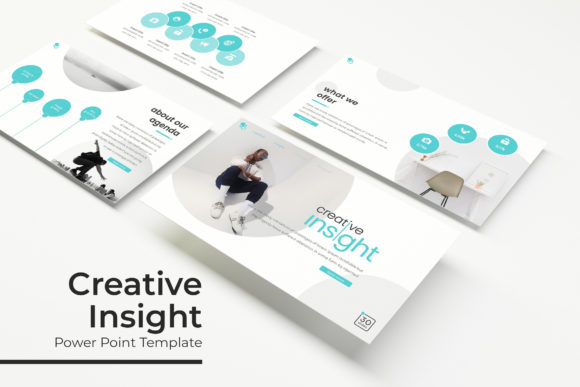
Creative Insight Power Point Template: A Complete Design Kit
Let's be honest: we've all been there. It’s 2 AM, you have a massive pitch deck due in the morning, and you are staring at a blank PowerPoint slide trying to decide if you should use "Calibri" or "Arial." It feels like choosing between beige and off-white. The problem with most corporate templates is that they stifle the very creativity you are trying to showcase. You need structure to look professional, but you need flexibility to tell your story. This is exactly where a high-quality asset changes the game. If you have been struggling to balance professional polish with creative flair, the Creative Insight Power Point Template might be the toolkit you didn’t know you needed.
More Than Just Slides: A Visual Communication System
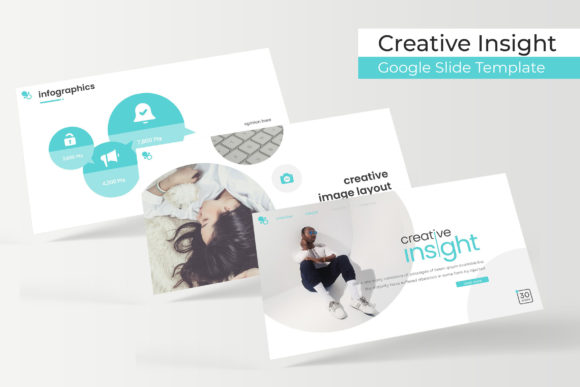
When you download a standard template, you usually get a handful of generic layouts. This package is designed differently. It functions less like a single file and more like a comprehensive visual communication system. We are talking about 150+ total slides distributed across 5 premade color themes. That means you get 30 unique slide layouts for each template color. This volume is crucial for anyone working on long-term projects. Whether you are a startup founder building a pitch deck, a marketer creating a quarterly report, or a designer presenting a portfolio, running out of slide variations halfway through is a nightmare. With this kit, you have enough room to breathe.
The visual appeal here relies on modern typography and layout principles. It isn't cluttered; it’s strategic. The use of whitespace allows your content to stand out, while the structured grids ensure that even if you aren't a professional designer, your alignment will look pixel-perfect. It removes the guesswork from layout design.
Streamlining Your Workflow with Smart Features
One of the biggest time-sinks in presentation design is formatting images. We’ve all tried to crop a rectangular photo into a perfect circle or a complex hexagon, only to have it look jagged or off-center. This template solves that with resizable and editable graphic picture placeholders. The "drag and drop" functionality means you can take a photo from your desktop, drop it onto the slide, and the software automatically crops it to fit the designated shape. It’s a small technical detail that saves hours of frustration.
Furthermore, the entire file is based on Master Slides. For those unfamiliar, Master Slides are the "brain" of the presentation. If you want to change a font style or move a logo to a different corner, you do it once in the Master, and it updates across all 150+ slides instantly. This is essential for maintaining visual consistency and brand recognition. If your client changes their mind about the header font (and they will), you can fix it in seconds rather than manually editing every single page.
Handcrafted Infographics and Visual Assets
Data visualization is often the weakest link in business presentations. A bar chart in Excel looks boring; a raw number on a slide is hard to digest. This is where the handcrafted infographics included in this package shine. You aren't just getting standard charts; you are getting visual metaphors for data. Whether it’s a timeline for a project roadmap, a comparison chart for market analysis, or a process flow for a new workflow, these graphics are designed to be understood at a glance.
Additionally, the inclusion of Section Break Slides helps in pacing your narrative. A good presentation needs breathing room. These breaks allow you to signal to your audience that you are moving to a new topic, helping them mentally reset and stay engaged. The Gallery and Portfolio slides are particularly useful for creatives—photographers, interior designers, and agencies—who need to let their work speak for itself with large, high-resolution imagery blocks.
Practical Applications: Beyond the Boardroom
While this is technically a presentation template, its utility extends far beyond corporate meetings. Because of the pixel-perfect illustrations and clean design, it serves as an excellent base for various digital products.
- Social Media Graphics: You can design slide decks specifically for Instagram carousels. The widescreen aspect ratio works perfectly for LinkedIn or Facebook posts. Export your slides as JPGs or PDFs, and you have a week's worth of cohesive social content.
- Digital Lookbooks: For fashion brands or product designers, the portfolio layouts are ideal for creating digital lookbooks to send to buyers or press contacts.
- Web Design Mockups: Use the slides to mockup website layouts. The modern typography and grid systems mimic popular web builders, making it easy to present a sitemap to a client before writing a single line of code.
- PDF Lead Magnets: Bloggers and coaches often create "Free Guides" or "Checklists" to grow their email lists. Instead of using a basic Word document, use these slides to create a visually stunning, high-value PDF that looks like a premium magazine.
Compatibility and Technical Details
Nothing is worse than buying a design asset and finding out it doesn't work with your software. This kit is built for Apple users, specifically including 5 KEY (Keynote) Files in KEY Widescreen format. If you are on a Mac, this is native software, meaning the animations and transitions will run smoother than they ever could in PowerPoint.
A critical component of this package is the typography. The designers have curated a specific look that relies on the right font pairing. To ensure you can replicate the exact look shown in the preview, the package includes a Readme First file with links to download the free fonts used. This is a lifesaver. You don’t have to hunt down the typeface or guess what it is; the link is provided, and since they are free fonts, you can use them for your commercial projects without worrying about licensing fees (though you should always double-check the font creator's license).
Choosing the Right Color Variation
Color psychology plays a massive role in how your message is received. The fact that this template comes in 5 color variations is a strategic advantage.
- High-Contrast/Bold: Use these for sales pitches or energetic startup presentations where you need to grab attention.
- Muted/Pastel: These are perfect for wellness brands, lifestyle blogs, or minimalist portfolios where the vibe needs to be calming and sophisticated.
- Dark Mode: Often included in premium sets, these are great for tech presentations or photography portfolios where you want the images to pop against a dark background.
Don't just pick your favorite color; pick the one that aligns with the brand identity of the project you are working on. If you are a freelancer, you might use the blue variation for a corporate client and the pastel variation for a bakery client, all using the same underlying structure.
Final Thoughts on Design Efficiency
Ultimately, a template is a tool to save you time and elevate your professional presentation. The Creative Insight Power Point Template (or Keynote, in this case) is designed for the busy creative who needs to look polished without spending 40 hours aligning text boxes. With features like picture placeholders, master slides, and a massive library of infographics, it bridges the gap between a blank canvas and a finished masterpiece.
Remember, the images in the preview are for illustration purposes only—you will need to supply your own photography to make it yours. But once you start dragging and dropping your own content into these pre-built frameworks, you’ll realize how much faster your design process becomes. It’s about working smarter, not harder, and letting the structure support your creativity rather than hinder it.